// data engineering · dbt
TL;DR
Agents Schema is not a new step in your build. It’s a CI sidecar that reads the artifacts your pipeline already produces (manifest.json, *.lkml, semantic view names) and writes them as metadata tables into an AGENTS schema in the same warehouse. Worth it if agents query Snowflake directly. Mostly noise if everyone consumes data through Looker.
The problem
A question that keeps coming up in dbt circles goes roughly like this:
Our process is: build dbt SQL models (including semantic views via the dbt Semantic View package, as an experiment), surface the tables/views/semantic views in Snowflake, then generate the LookML files from Snowflake. Where would Agents Schema fit, and what are the trade-offs?
The confusion is understandable. Agents Schema touches all three layers — dbt, the warehouse, the BI semantic layer — so it’s easy to read it as a replacement for one of them. It isn’t. It replaces none of them.
What I tried
I read the README, the SPEC and the setup guides, and mapped each stage of that pipeline to what the project actually ships.
What it is, in one sentence
Agents need context that table schemas don’t carry — what a table is for, who owns it, what produced it, how it relates to other tables. Agents Schema puts that context in the warehouse itself, in a standard AGENTS schema, so anything that can run SQL can find it. The project describes itself as closest in spirit to information_schema, but extensible across providers.
The mapping
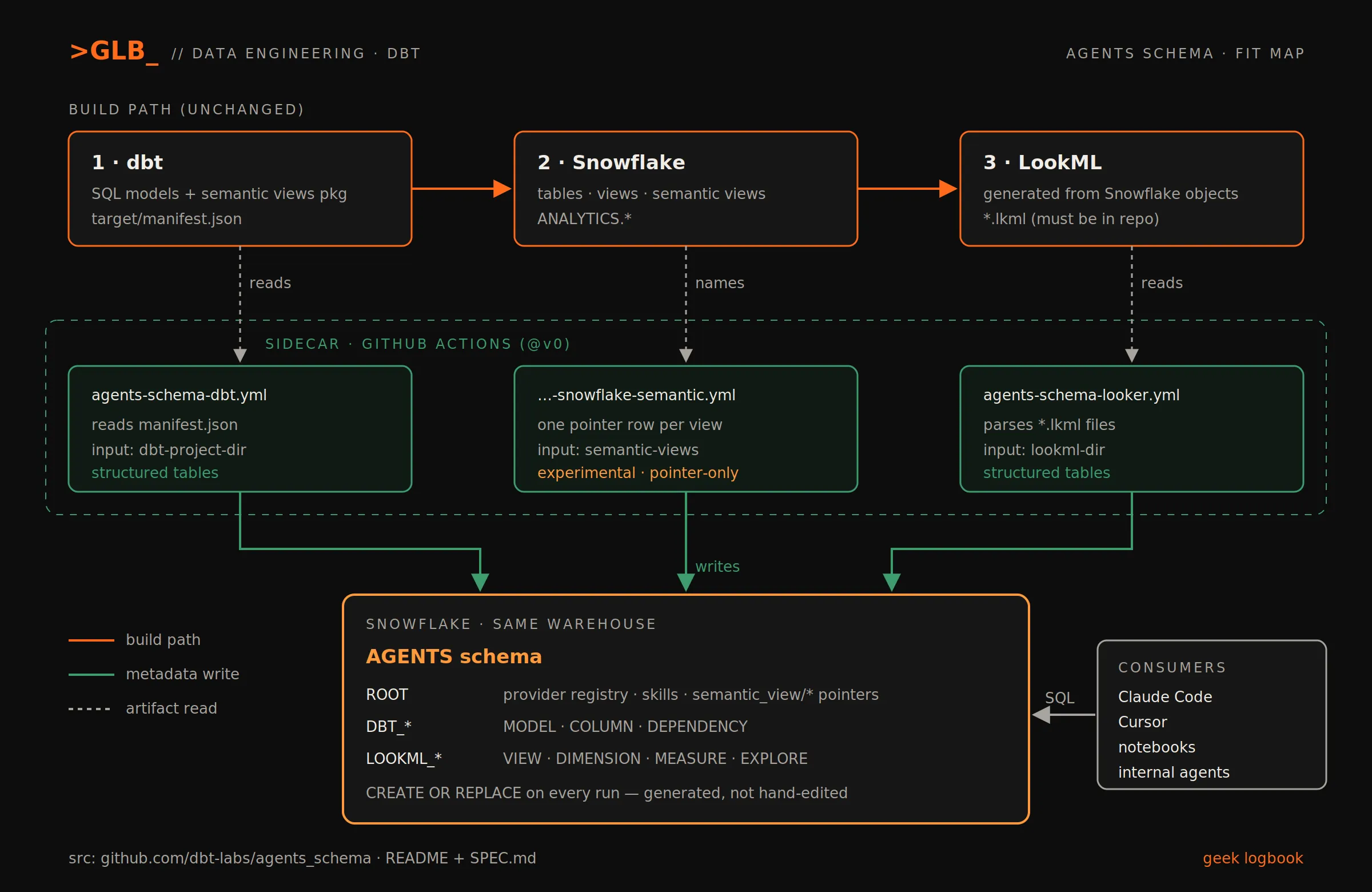
| Pipeline stage | Agents Schema job | What lands in AGENTS |
|---|---|---|
| 1. dbt models | agents-schema-dbt.yml (reads target/manifest.json) | DBT_MODEL, DBT_COLUMN, DBT_DEPENDENCY |
| 2. Semantic views in Snowflake | agents-schema-snowflake-semantic.yml | pointer rows in ROOT (semantic_view/<fqn>) |
| 3. LookML | agents-schema-looker.yml (parses *.lkml) | LOOKML_VIEW, LOOKML_DIMENSION, LOOKML_MEASURE, LOOKML_EXPLORE |
The build path doesn’t change. The sync jobs run beside it.
Wiring it up
Every workflow authenticates with a single GitHub Actions secret, WAREHOUSE_CREDENTIALS. For Snowflake, the dbt setup guide recommends key-pair auth:
type: snowflake
account: abc123
user: AGENTS_SCHEMA_BOT
warehouse: COMPUTE_WH
database: ANALYTICS
role: TRANSFORMER
private_key_pem: |
  -----BEGIN ENCRYPTED PRIVATE KEY-----
  ...
  -----END ENCRYPTED PRIVATE KEY-----
private_key_passphrase: your-passphrase
Then one workflow file covering all three stages:
name: Agents Schema

on:
  workflow_dispatch:
  push:
    branches: [main]

jobs:
  agents-schema-dbt:
    uses: dbt-labs/agents_schema/.github/workflows/agents-schema-dbt.yml@v0
    with:
      dbt-project-dir: dbt_project
    secrets:
      WAREHOUSE_CREDENTIALS: ${{ secrets.WAREHOUSE_CREDENTIALS }}

  agents-schema-snowflake-semantic:
    uses: dbt-labs/agents_schema/.github/workflows/agents-schema-snowflake-semantic.yml@v0
    with:
      semantic-views: |
        ANALYTICS.FINANCE.REVENUE
    secrets:
      WAREHOUSE_CREDENTIALS: ${{ secrets.WAREHOUSE_CREDENTIALS }}

  agents-schema-looker:
    uses: dbt-labs/agents_schema/.github/workflows/agents-schema-looker.yml@v0
    with:
      lookml-dir: lookml
    secrets:
      WAREHOUSE_CREDENTIALS: ${{ secrets.WAREHOUSE_CREDENTIALS }}
Two gotchas from the docs:
- The dbt job expects
<dbt project>/target/manifest.jsonto exist. If your repo doesn’t produce it in CI, the setup guide tells you to generate it and commit it. - The Looker job parses
.lkmlfiles from the repo. If your LookML is generated from Snowflake and never committed, this job has nothing to read.
What an agent sees
Discovery starts at ROOT, the provider registry:
SELECT provider, key
FROM AGENTS.ROOT
ORDER BY provider, key;
Semantic view pointers:
SELECT key, content
FROM AGENTS.ROOT
WHERE provider = 'snowflake_semantic'
  AND key LIKE 'semantic_view/%';
And the interesting one for this pipeline — tracing a LookML view back to the dbt model behind it. This is the cross-source query from the SPEC:
SELECT
  v.name AS lookml_view,
  v.sql_table_name,
  m.unique_id AS dbt_model_id,
  m.name AS dbt_model,
  m.schema_name,
  m.description AS dbt_description
FROM AGENTS.LOOKML_VIEW v
LEFT JOIN AGENTS.DBT_MODEL m
  ON LOWER(v.sql_table_name) LIKE '%' || LOWER(m.schema_name) || '.' || LOWER(m.name) || '%';
The SPEC is upfront that this join is heuristic, since sql_table_name is free-form LookML text. When LookML is generated from Snowflake objects, sql_table_name should be clean fully qualified names, so the heuristic has a better chance of matching than in hand-written LookML.
What actually worked
The answer to “where does it fit” is: after each stage, not between them. Here’s the trade-off sheet.
Pros
- One SQL-queryable surface. Claude Code, Cursor, notebooks and internal agents read
AGENTS.*like any other table. No extra server to run. - Lineage across layers. dbt model → Snowflake object → LookML view becomes joinable. That’s the piece this pipeline doesn’t have today.
- Self-describing.
ROOTtells the agent which providers are present and what their tables mean. - Skill delivery. Markdown skills can be published as
ROOTrows withskill/<name>keys, so query recipes and domain rules travel with the data.
Cons
- Early. Releases are
v0.x. Pin an exact tag or SHA if you care about stability;@v0floats. - Semantic views are the weakest link. The Snowflake Semantic job is experimental and pointer-only: it writes no dimension, metric or relationship tables. The definition stays in Snowflake. That’s exactly the part of this pipeline that is already experimental.
- Loose contract, on purpose. The spec assumes the consumer is an LLM, so
contentcan be semi-structured and change shape. Fine for agents, bad for anything deterministic built on top. - It’s a snapshot. Each ingestion runs
CREATE OR REPLACE TABLEon its own table family. If the workflow doesn’t run on every deploy, the metadata drifts from reality. - A write credential in CI.
WAREHOUSE_CREDENTIALSneeds create/write on theAGENTSschema. The SPEC recommends tightly scoped write access and broad read access. Use a dedicated service user, not your dbt role. - Not a dev tool. For agents editing the dbt repo, the project itself says to keep using dbt source files and artifacts directly, e.g. through the dbt MCP server.
Decision heuristic
| If… | Then |
|---|---|
| Agents query Snowflake directly and need to discover what exists across dbt, semantic views and LookML | Add it |
| All consumption goes through Looker (and its own AI features) | Skip it |
| The only agent use case is writing dbt code | Skip it; use dbt artifacts / dbt MCP |
| You depend on semantic views being fully described | Wait — pointer-only today |
Key takeaways
- Agents Schema is a metadata sidecar, not a pipeline stage. Your dbt → Snowflake → LookML flow stays the same.
- The real win for this setup is the dbt ↔ LookML join inside the warehouse; semantic view support is still a pointer.
- Commit your LookML and
manifest.json, pin a release, and give it its own write-scoped service user before rolling it out.
References
- README — https://github.com/dbt-labs/agents_schema/blob/main/README.md
- SPEC (schema contract, cross-source queries, permissions) — https://github.com/dbt-labs/agents_schema/blob/main/SPEC.md
- dbt setup — https://github.com/dbt-labs/agents_schema/blob/main/dbt-setup.md
- Looker setup — https://github.com/dbt-labs/agents_schema/blob/main/looker-setup.md
- Multi-source example — https://github.com/dbt-labs/agents_schema/blob/main/examples/workflows/dbt-looker.yml
26 Sep 2026 · #dbt #snowflake #agents
GLB_